Anyone that has worked with ASNA databases know that a server reboot without stopping the database service can take a long time to repair after reboot. Here we give you guidance on how to configure Windows Task Scheduler to automatically stop the database server on computer reboots.
Instructions to Set Automatic Shutdown of ASNA Database on Reboot:
Create a Task in Task Scheduler
Name: Stop ASNA Database on Reboot
Run whether user is logged on or not
Run with highest privileges
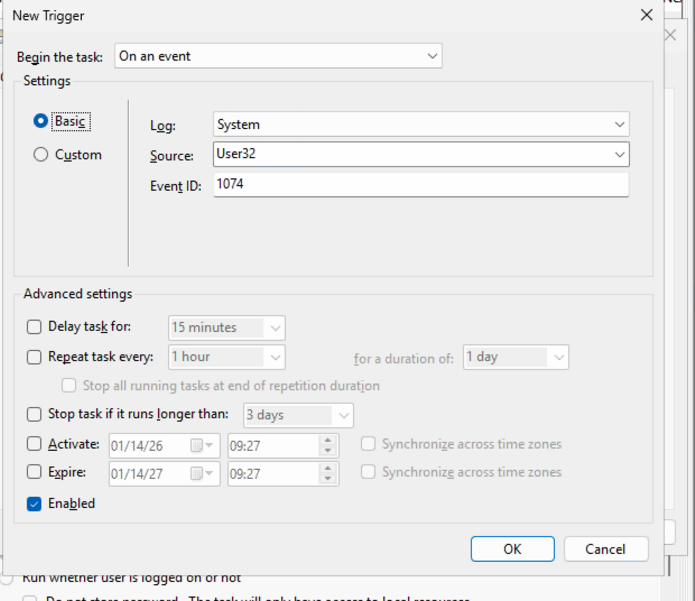
Trigger: On an Event
Basic
Log: System
Source: User32
Event ID: 1074
Make sure enabled
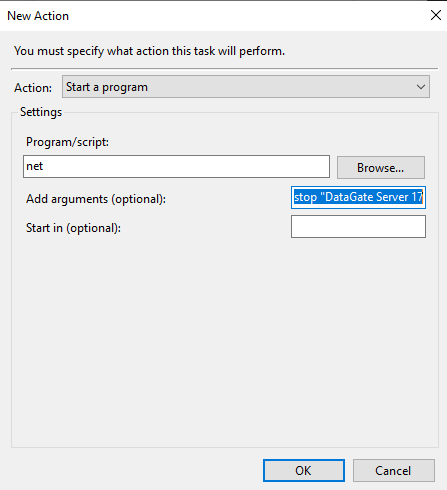
Actions: Start a Program
Program: net
Arguments: stop "DataGate Server 17" *** or whatever is listed in services.msc for ASNA DataGate
Was this article helpful?
That’s Great!
Thank you for your feedback
Sorry! We couldn't be helpful
Thank you for your feedback
Feedback sent
We appreciate your effort and will try to fix the article